A webhook from a payment gateway arrived at 11:40 on a Thursday night and our handler did nothing with it. The log line was a single row, 3,900 characters wide, starting with {"event":"payment.captured","payload":{"payment":{"entity":{"id":"pay_... and ending somewhere off the right edge of the screen. The answer to “why did nothing happen” was in there. Finding it meant reading that row.
We did what everyone does. Copy the line, open a browser tab, search for “json viewer”, paste into the first result. The tree appeared, the problem turned out to be a notes object sitting where we expected a notes array, and the handler was fixed in ten minutes.
Then the uncomfortable part. That payload held a real customer’s email, their phone number, the amount they had paid and the last four digits of their card. We had just handed it to a website we had never read a line about, with three ad units and a “pro” tier. We had no idea where the paste went or how long it stayed there.
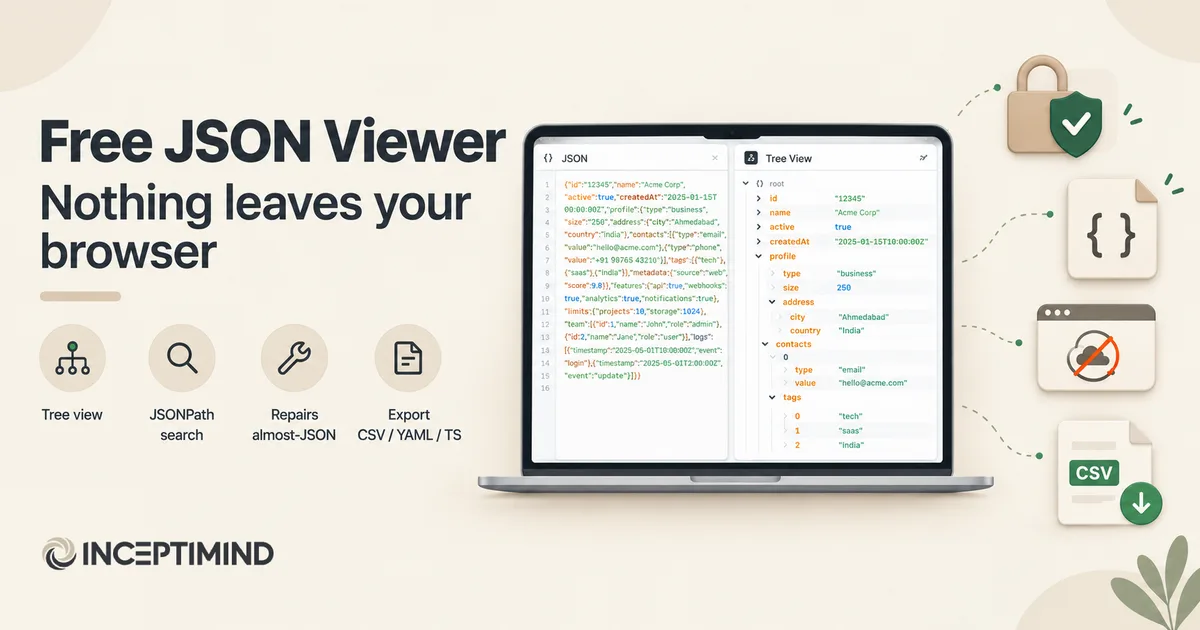
So we built our own. It is at jsonviewer.inceptimind.com, it is free, and the whole point of it is that your paste never leaves your browser. It is a standalone tool for anyone who reads JSON for a living: backend and frontend developers, QA, data and ops people, anyone who has ever squinted at an API response. This post explains how it works, where it fits in a working day, and how to judge any JSON tool before you paste something you would not want to lose.
What an Online JSON Tool Does With Your Paste
Most JSON viewers on the web are a text box, a server and a database. You paste, the page posts the text to the server, the server formats it and sends it back. Sometimes the server also keeps a copy so you can “share” a link, which means the copy now lives on a disk you do not control, under terms you did not read.
For a shopping list, who cares. For the payloads people actually paste at work, it matters a great deal:
- A payment webhook carries names, emails, amounts and partial card data. Under India’s DPDP Act that is personal data you are responsible for, whether or not a third-party tool promised to delete it.
- A CRM or HR export carries your entire customer or employee list.
- A messaging webhook carries phone numbers and the text of private conversations.
- An error response from your own API often carries a stack trace and the internal hostnames in it.
The fix is not a privacy policy. It is a page that cannot phone home. Our viewer ships a Content Security Policy that sets connect-src 'self'. That is a browser-enforced rule: any attempt by the page, including its own scripts, to make a request to another origin is refused before it leaves the tab. There is no server-side endpoint to post to, no analytics script, no cookie. You can confirm this yourself in the network tab of your browser’s developer tools: after the page loads, nothing else is requested, no matter what you paste.
The one thing the viewer does remember is your last input, and it keeps that in your browser’s local storage so a refresh does not lose your work. Clear it with the Clear button or by clearing site data. It never reaches us.
Reading a Webhook in Thirty Seconds
Here is the workflow that replaced our 11:40 pm scramble.
Open the viewer, paste the log line. The left pane is an editor, the right pane is a tree. The tree opens the root and its direct children, which for most webhooks means you immediately see the event name and a payload or data object. Click the chevron on payload, then on payment, then on entity, and you are looking at the object that holds everything interesting.
Now the part that saves real time. Click any key and its path is copied to your clipboard, in the notation your code uses. For the payment status that is:
payload.payment.entity.statusPaste that straight into your handler, your log filter or your test assertion. No counting brackets, no typos in the index. Switch the path style to bracket notation if you are copying into a shell script or a tool that treats dots differently.
Hover any row and a copy icon appears for the value. For a nested object you get the minified JSON; for a string you get the raw text without the surrounding quotes, which is what you want when you are copying an ID into a test.
The stats row at the bottom tells you the shape at a glance: how many keys, how deep it nests, how many strings, numbers and nulls. On a webhook that is a quick sanity check. A payload with no payment key under payload is not a capture event, it is a refund or a dispute, and that was exactly the kind of thing our handler was tripping on that night.
The Payloads That Only Look Like JSON
Half the things people paste into a JSON viewer are not JSON. They are close. They came from a Python log that printed True and None. They came from a JavaScript object literal with unquoted keys. They came from a Slack message where someone’s phone turned every straight quote into a curly one. A strict viewer refuses all of them with a cryptic error, and you spend five minutes fixing quotes by hand before you can read anything.
Our viewer takes a different stance. It parses strictly first. If that fails, it repairs the common mistakes and tries again with a lenient parser. If the lenient pass succeeds, you get the tree exactly as you would for valid input, with one difference: the status line turns amber and says what it bent. “Not strict JSON. Repaired: unquoted keys, trailing commas.” Next to it is a button, Convert to strict JSON, that rewrites the editor so you can paste the clean version into whatever refused it.
The repairs it makes:
- Unquoted keys and single-quoted strings
- Trailing commas and comments
- Smart quotes from chat apps and documents
- Python’s
True,FalseandNone - A byte order mark at the start of a file
One more case is common enough to deserve its own button. A body that has been JSON-encoded twice arrives as a string that contains JSON: "{\"event\":\"payment.captured\", ...}". Strictly speaking that is valid JSON, it is just a string. The viewer notices when a string value is itself a JSON object or array and offers Unwrap, which replaces the document with the inner one. This is the single most frequent reason a payload “parses fine but has no fields”.
We were deliberate about one thing: the green “Valid JSON” label only ever appears for strict input. Lenient input is always labelled as repaired. A viewer that quietly accepts {a: 1} and calls it valid would mislead you the moment you paste the same thing into a real API.
When even the lenient pass fails, the right pane shows the error line with two lines of context, a caret under the exact column, and a sentence that says what to fix rather than what the parser choked on. “A value is missing after ’:’” instead of “invalid character ’}’”. The original parser wording is still there, in a muted line underneath, for the people who want it.
Finding One Value in Forty Thousand
A tree is only useful if you can get to the right branch. Two kinds of search cover it.
Text search matches keys and primitive values, case-insensitively, as you type. Every match is highlighted and the parents of every match open automatically, so a hit six levels deep is visible without clicking. Enter steps to the next match, Shift+Enter to the previous, and the counter shows where you are.
For anything structural, start the query with a dollar sign and the same box becomes a JSONPath query. A few that earn their keep on real payloads:
$.orders[*].customer.email
$..status
$.items[?(@.price > 1000)].sku
$.events[?(@.type == 'error' && @.retries < 3)].id
The first pulls every customer email from an order export. The second finds every status field anywhere in the document, however deep. The last two are filters: numeric and string comparisons, combined with and, or and not, with slices and unions available when you need them. A malformed expression shows a short error under the box instead of silently matching nothing.
Matches from a JSONPath query behave exactly like text matches. They highlight, they open their parents, and Enter steps through them. If you have ever written a filter in the viewer and then pasted it into your own code, you know why that matters: the expression you debugged is the expression you ship.
For a very wide document there is also a Levels control in the tree menu. Open to level 2 collapses everything below the second tier, which turns a 40,000-row export into a readable table of contents.
From Viewer to the Next Step
Reading the payload is rarely the end of the job. The viewer tries to hand you off cleanly.
Format and minify do what you expect. There is also an auto-format mode, off by default, that reformats the editor by itself whenever the input parses and you pause typing, keeping your cursor on the same token. Minify switches it off so your minified text stays minified.
Sort keys orders every object alphabetically at every level, with natural number order so item2 comes before item10. Useful before a diff in your editor, or when you are comparing two responses by eye.
Export offers four formats, each as copy or download:
- JSON, formatted with your chosen indent
- YAML, for config files and documentation
- CSV, for arrays of objects. One row per object, one column per key that appears anywhere, nested values serialised inline. This is how a colleague in finance gets a spreadsheet of yesterday’s failed payments without anyone writing a script.
- TypeScript, as interfaces inferred from the data. Keys that are missing from some objects in an array become optional. Paste the response, download
document.ts, and your client code is typed in a minute.
Share link encodes the document into the URL after the hash. That part of a URL is never sent to a server, so the link is as private as the page: the JSON travels inside the link text itself. The practical limit is about 8 KB, which covers a webhook or an error response but not a full export. Above that the viewer tells you rather than silently truncating.
The editor side has the small keyboard habits you expect from a code editor. Select text and press a quote or bracket to wrap it. Press an opening brace on empty space and the closer appears. Enter keeps your indentation and adds a level after a brace. Tab and Shift+Tab indent selected lines. Alt+Up and Alt+Down move lines. Ctrl+Z undoes all of it, because the edits go through the browser’s own undo stack.
Try it on the payload you are staring at right now.
Paste it, read it as a tree, copy the path you need. No account, no upload, no limits. Built by the team behind Inceptimind Chat, and free whether or not you ever use anything else we make.
Open the JSON ViewerA Five-Minute Setup for Your Team
You do not install anything, but a few minutes of setup make it stick.
- Bookmark jsonviewer.inceptimind.com in the browser profile you use for work. On a phone, add it to the home screen; it has a proper icon.
- Set your preferences once. Indent, path style (dot or bracket notation) and theme live in the menus and are remembered on that device.
- Decide on a path style with your team. If your code is JavaScript or Python, dot notation. If you are copying into shell scripts or jq, bracket notation avoids escaping surprises.
- Put the link in the runbook next to wherever your webhook and API logs live, so nobody reaches for a random search result at midnight.
- Try one deliberately broken paste, something like
{"a": }, so everyone has seen what the error panel looks like before they need it.
That is the whole rollout. There are no seats to buy, no admin to invite and nothing to keep updated.
How to Judge Any JSON Tool Before You Paste
We built ours to pass this list. Use it on any tool, including ours.
- Open the network tab, paste something, watch. If a request fires after the page has loaded, your data went somewhere. A tool that processes locally makes no requests at all.
- Look for a Content Security Policy. View the page source and search for
connect-src. If it is set to'self', the browser enforces the no-upload promise, not the vendor. - Ask how sharing works. A short link that resolves on the vendor’s server means the vendor stored your document. A long link with the data after the hash means they did not.
- Check what it calls valid. Paste
{a: 1}. If the tool says “valid JSON”, it will lie to you about real payloads too. - Read the about text. A tool that explains its own privacy model in plain language has usually thought about it. One that only has a “pro” button has usually thought about something else.
If a tool fails the first two, do not paste customer data into it, whatever the policy page says. The policy is a promise. The network tab is a fact.
The Decision
Next time a log line is too wide to read, resist the first search result. Paste it into a viewer that cannot send it anywhere, copy the path you need, and get back to the fix. The link is jsonviewer.inceptimind.com. It will stay free and it will stay local.
If you arrived here from our messaging guides, the payloads you will read most are the ones described in the complete guide to WhatsApp automation for business, the fetch responses from the step-by-step guide to creating a WhatsApp chatbot, and the rejection details covered in the WhatsApp template approval guide. The viewer reads all three the same way it reads everything else.